

Download Partition Doctor – data recovery, file recovery, hard drive recovery, partition recovery, disk recovery, recovery tool
Overview
Partition Doctor is a data recovery utility designed to assist users in retrieving lost files, damaged partition tables, and corrupted boot records following accidental deletions or drive formatting. The software targets individuals who face urgent data loss scenarios, such as students, professionals, and home users managing critical personal or work-related files. Its primary function is to restore data from severely damaged storage devices, offering a lifeline when conventional methods fail. The application operates on the Windows platform, making it accessible to users within the PC ecosystem who rely on desktop or laptop systems for daily operations. Although the developer did not provide additional technical details about the underlying algorithms or recovery mechanisms, the tool is positioned as a reliable solution for users without advanced technical knowledge. Real-world use cases include recovering documents after accidental formatting, retrieving photos from a corrupted external drive, or restoring system files after a failed partition operation. In the broader context of data recovery tools, Partition Doctor fills a niche for users seeking a straightforward, no-frills solution that prioritizes usability over advanced customization. Its continued relevance, despite its release date in 2013, suggests a stable core functionality that meets basic recovery needs for a specific user segment.Key Features & Functionality
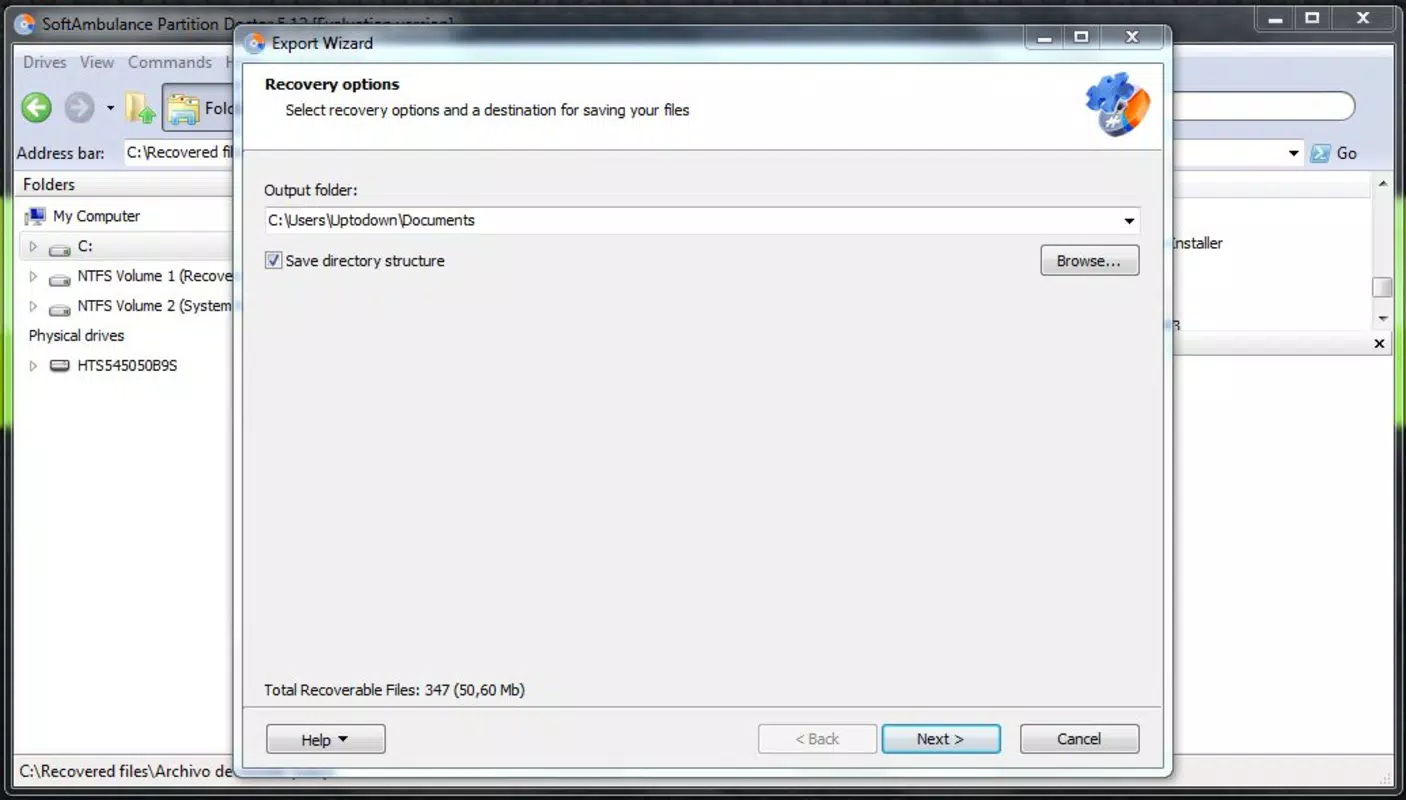
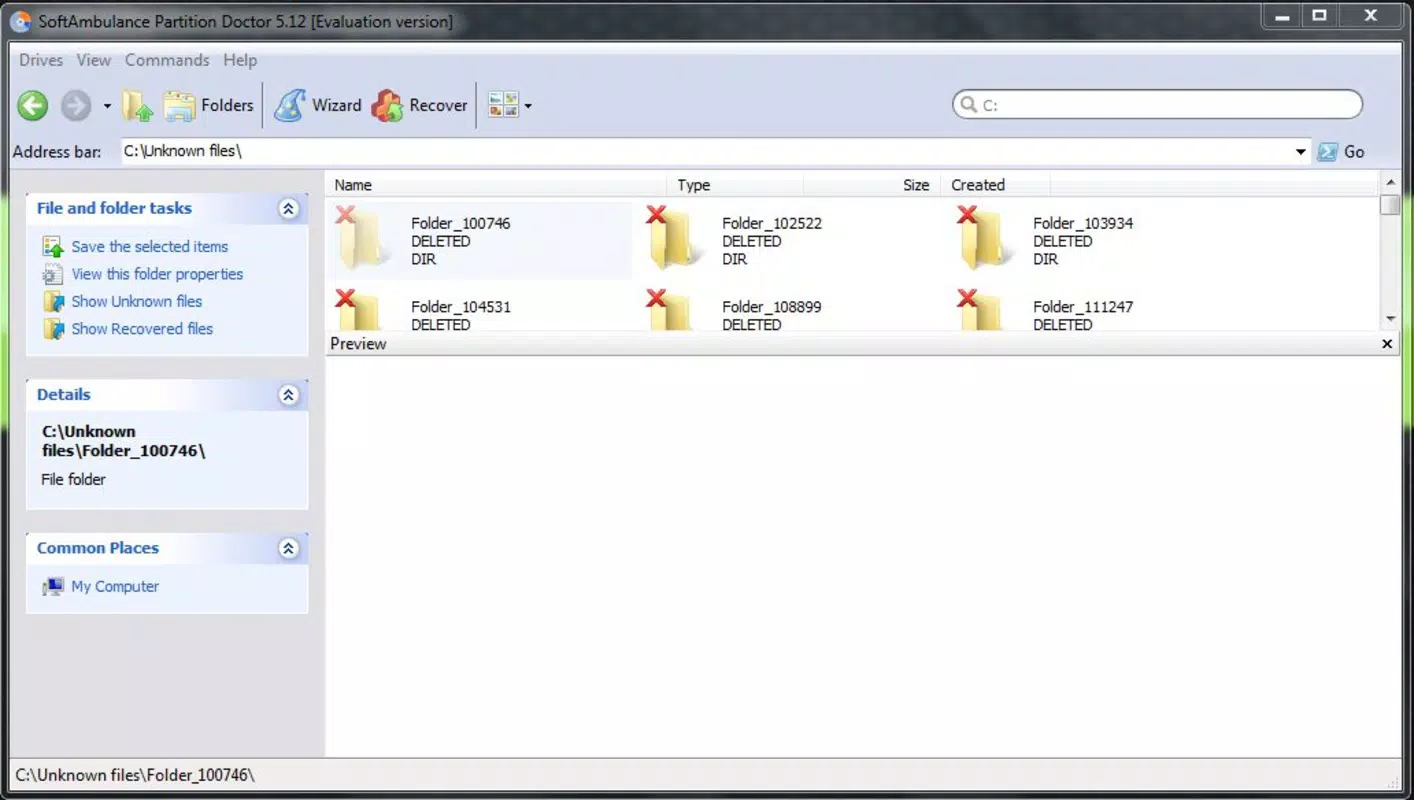
Partition Doctor delivers a suite of recovery-focused tools tailored to address common data loss challenges. The software features a user-friendly wizard interface that guides users step-by-step through the recovery process, minimizing the learning curve for non-technical users. This structured approach ensures that even individuals with minimal experience in data recovery can navigate the application confidently. A key functionality is its automated scanning system, which intelligently detects lost or corrupted partitions and retrieves associated files without requiring manual file selection. This feature significantly reduces user error and streamlines the recovery workflow. The tool is also capable of repairing damaged directory structures, a critical function when a drive’s file system becomes corrupted due to formatting or system crashes. By reconstructing the file hierarchy, Partition Doctor helps users regain access to folders and files that were previously inaccessible. Additionally, the software allows selective recovery, enabling users to choose specific files or directories to restore. This prevents unnecessary clutter and conserves storage space during the recovery process. Each feature is designed with practicality in mind—whether recovering a single important document or restoring an entire partition after a system failure. The combination of automated scanning, intuitive navigation, and selective recovery makes Partition Doctor a valuable tool for users facing urgent data loss, particularly in environments where technical support is unavailable.Real-World Use Case Examples
- Recovering a thesis document after a hard drive was accidentally formatted.
- Restoring photos from an external USB drive that failed to mount.
- Rebuilding a corrupted partition table after a failed Windows update.
- Recovering critical business files following a system crash.
- Recovering data from a drive with a damaged boot sector.
Interface, UX & Performance
The user interface of Partition Doctor is designed with simplicity and clarity in mind, emphasizing ease of navigation over visual complexity. The layout follows a linear wizard format, where each step is clearly labeled and accompanied by concise instructions. This approach reduces cognitive load and ensures that users can progress through the recovery process without confusion. Visual feedback during scanning and recovery operations is consistent, with progress indicators and status messages that help users understand the current stage. Although the developer did not list formal performance metrics, the software is described as efficient in scanning and recovering data from damaged drives. Users can expect responsive behavior across a range of device categories, including older systems and modern desktops. Stability appears to be a priority, as the tool is capable of handling severely corrupted partitions without crashing. However, specific requirements for RAM, CPU, or disk space were not disclosed. The software does not appear to consume excessive system resources during operation, which is beneficial for users working on machines with limited performance. Overall, the user experience is optimized for accessibility and reliability, particularly for individuals who may be under stress due to data loss. The lack of advanced customization options is a trade-off for simplicity, which may appeal to users seeking a straightforward solution rather than a feature-rich platform.Platform Compatibility & Technical Requirements
Partition Doctor is available exclusively for the Windows operating system. The current version is 2.1.1, with a file size of 25.6 MB. This compact footprint suggests efficient resource usage and minimal installation overhead. The application does not require extensive system specifications, which contributes to its broad compatibility across various Windows environments. However, the developer did not specify minimum OS requirements, such as Windows 7, 8, 10, or 11. Similarly, no details were provided about processor architecture, RAM, or available disk space. Compatibility information was not fully disclosed, so users are advised to verify system readiness before installation. The software is not available on mobile platforms such as Android or iOS, nor is it offered as a web-based tool. This limits its accessibility to desktop and laptop users. The absence of cloud integration or cross-device synchronization is also notable, as the tool functions as a standalone utility. Despite its age, the application remains functional on modern Windows systems, though users should ensure their systems are up to date to avoid potential conflicts.Pros and Cons
- Simple, intuitive wizard interface ideal for beginners.
- Automated scanning reduces user error and speeds up recovery.
- Effective at recovering data from severely damaged partitions.
- Supports selective recovery to minimize clutter.
- Compact file size (25.6 MB) with low system resource usage.
- Released in 2013; may lack support for newer file systems or drive types.
- No information on minimum OS or hardware requirements.
- Not available on mobile platforms or as a web app.
- Does not include cloud backup or synchronization features.
- Limited customization options for advanced users.
FAQ
Is Partition Doctor safe to use?
Yes, the software is designed to recover data without modifying the original drive contents, making it a safe option for data recovery. However, users should avoid writing new data to the affected drive to prevent overwriting lost files.
Can Partition Doctor recover data from SSDs?
While the developer did not specify SSD compatibility, the tool is designed to work with standard storage drives. Users should test it on SSDs with caution, as wear-leveling and TRIM functions may affect recovery outcomes.
Does Partition Doctor require a license for continued use?
Yes, the software is a paid tool priced at $49.95. It does not offer a free version or trial period, so users must purchase it to access full functionality.
How often should I update Partition Doctor?
The developer has not provided update frequency details. Users should monitor official channels for any patches or new releases, especially if compatibility with newer systems becomes an issue.
Can I use Partition Doctor on multiple computers?
The licensing terms were not disclosed. Users should consult the official website or purchase agreement to determine if the license permits use across multiple devices.


